

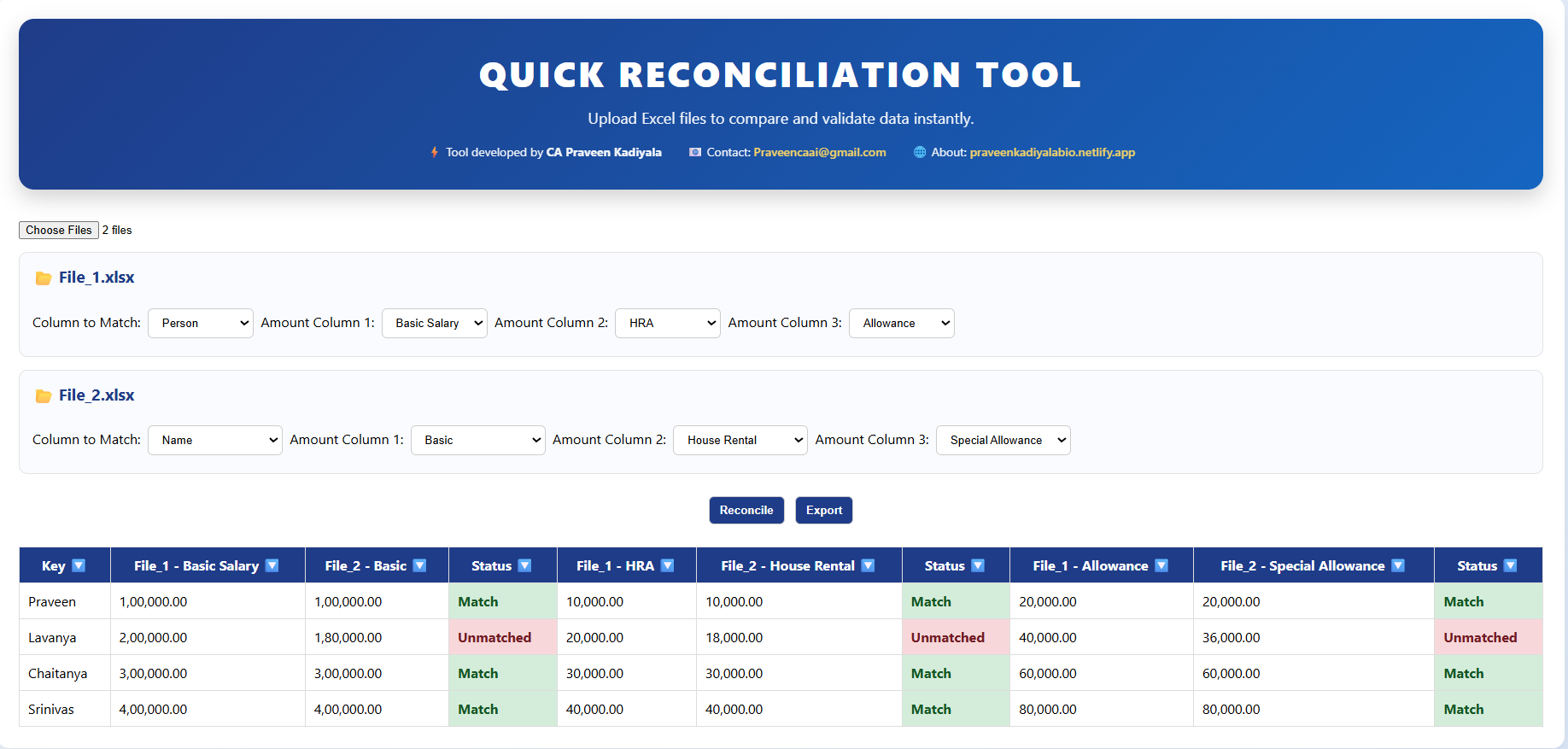

Intelligent Excel Reconciliation – Multi-File, Multi-Column Matching Made Simple
Problem
Finance professionals often spend significant time performing manual reconciliations using Excel functions like VLOOKUP, XLOOKUP, SUMIFS, or Pivot Tables. This process becomes even more complex when dealing with multiple files and multiple financial components (Example - such as salary, HRA, and allowances) This prompt enables automated reconciliation by allowing users to upload multiple Excel files, group and aggregate data, and compare selected columns across files. It helps quickly identify matches, mismatches, and missing records — reducing manual effort, improving accuracy, and saving time.
Prompt Input
- Two or more Excel files containing structured data - A common key column (e.g., Name, Invoice Number, ID) - One or more amount columns from each file (e.g., Basic, HRA, Allowance) - Data may contain duplicate entries, which will be grouped and aggregated automatically Example: File 1 → Name, Basic, House Rent, Special Allowance File 2 → Person, Basic Salary, HRA, Allowance
Prompt Output
1. A tabular reconciliation report showing: - Key-wise comparison across files - Aggregated values for selected columns - Status for each component (Match / Unmatched / Missing) 2. Clear identification of mismatches and missing data 3. Filter-enabled view for easy analysis 4. Export-ready output for further use